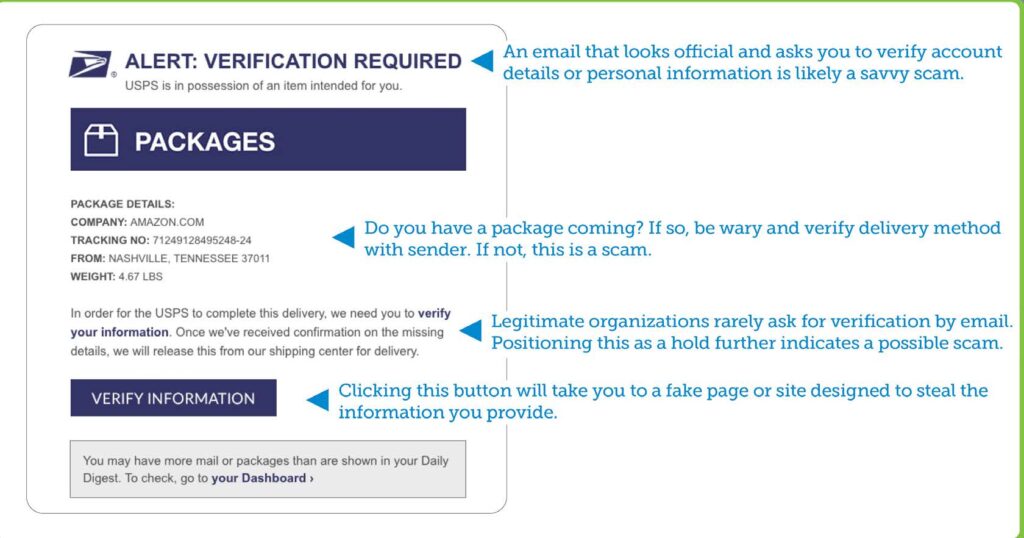

The email threats faced by organizations today vary greatly in complexity, volume, and impact. Here we take a closer look so you can spot the threat before it harms you or your organization.
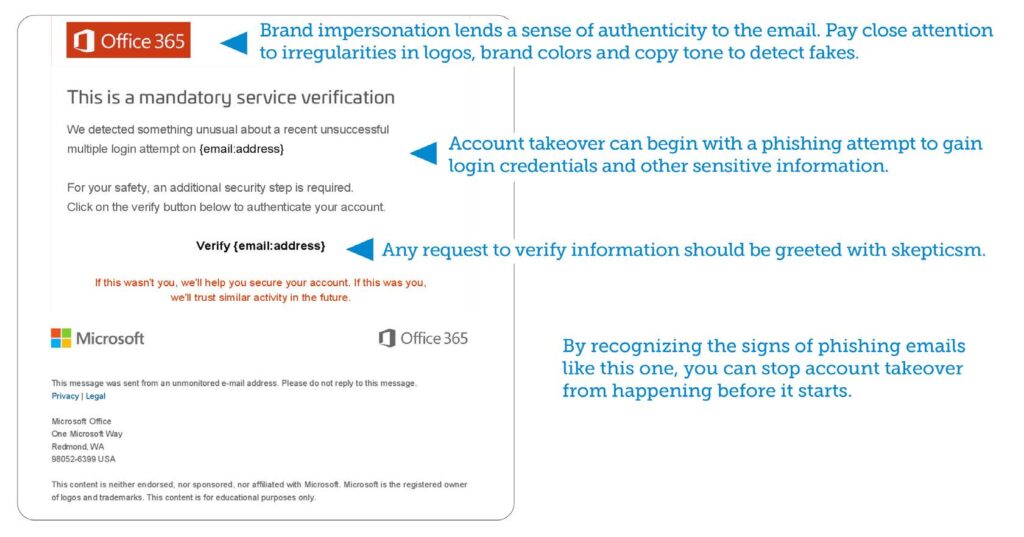
Account takeover is a form of identity theft and fraud, where a malicious third party successfully gains access to a user’s account credentials. Cybercriminals use brand impersonation, social engineering, and phishing to steal login credentials and access email accounts. Once the account is compromised, hackers monitor and track activity to learn how the company does business, the email signatures they use, and the way financial transactions are handled. This helps them launch successful attacks, including harvesting additional login credentials for other accounts.
Combatting account takeover requires a variety of strategies:
- Identifying the signs of phishing emails that could lead to account compromise.
- Recognizing signs of brand impersonation and url spoofing.
- Fortifying yourself against social engineering tactics by knowing how social engineers operate.
The sample shown is typical of emails that lead to account takeover.
Did you know that the FBI reported $1.7 billion in Business Email Compromise losses in 2019? Here we take a closer look so you can spot the threat before it harms you or your organization.
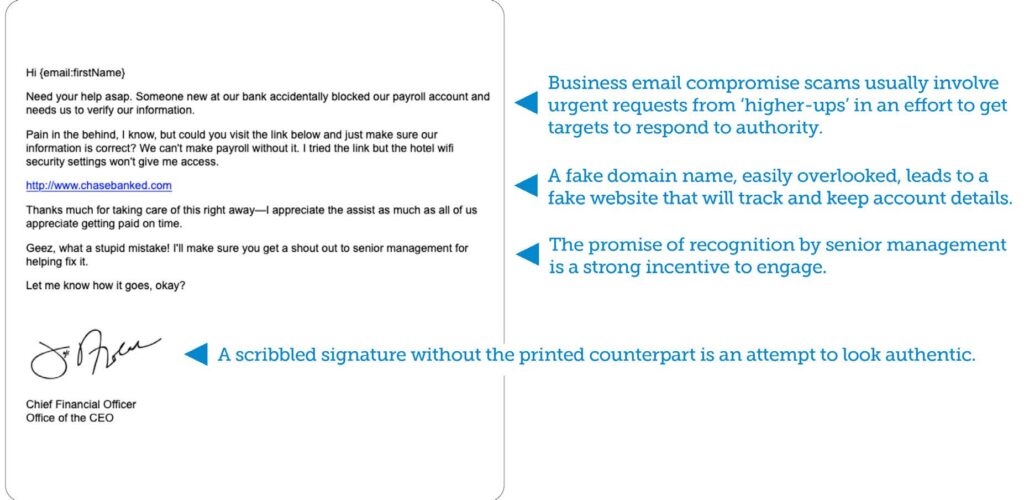
In Business Email Compromise (BEC) attacks, scammers impersonate an employee in the organization in order to defraud the company, its employees, customers, or partners. In most cases, attackers focus their efforts on employees with access to the company’s finances or personal information, tricking
individuals into performing wire transfers or disclosing sensitive information. These attacks use social-engineering tactics and compromised accounts and are usually devoid of attachments and links found in typical phishing emails.
BEC emails may leverage authority to elicit a response. As such, they often appear to come from the CEO or other high-level executive.
How to avoid becoming a victim of Business Email Compromise:
- Be skeptical if you normally don’t get emails from higher-ups.
- Keep calm if the email claims to be urgent.
- Verify the legitimacy of the email by calling the sender.
- Report the email to management or IT if you think it’s a fraud.
Example:
The email threats faced by organizations today vary greatly in complexity, volume, and impact. Here we take a closer look so you can spot the threat before it harms you or your organization.
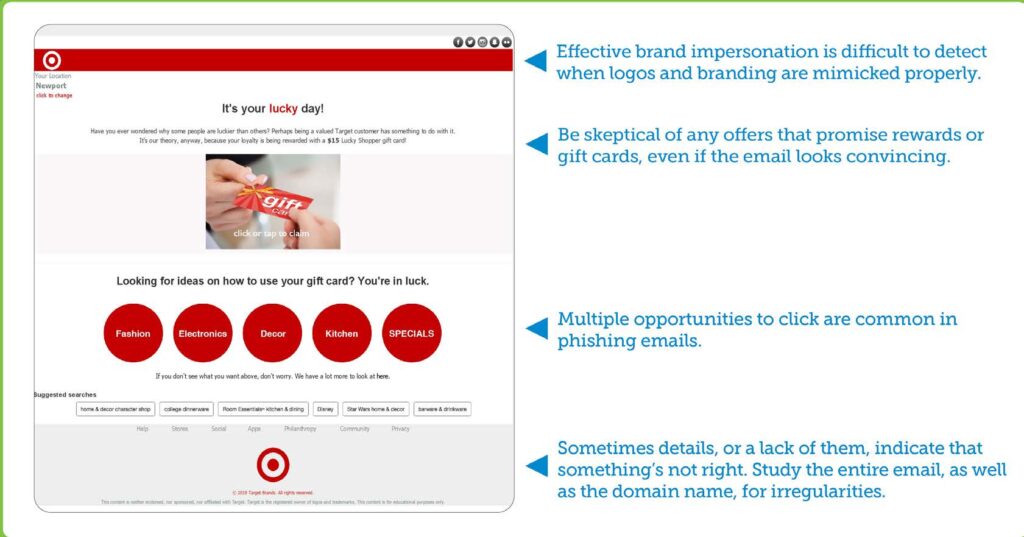
Brand impersonation is designed to mimic a familiar company or business to trick victims into responding and disclosing personal or otherwise sensitive information. Common types of brand impersonation include, service impersonation, a phishing attack designed to harvest login credentials for personal or business accounts, and brand hijacking, whereby fake or spoofed domain names provide the illusion of legitimacy.
Brand impersonation can be difficult to detect when executed well but spoofing a brand convincingly can prove equally challenging for cybercriminals. By paying close attention to things like:
- logo use and placement
- adherence to brand colors and overall design
- copy, tone and overall content
- domain names and web addresses
You can spot irregularities and potential spoofing attempts. The sample shown indicates signs of brand impersonation.
Did you know that a Barracuda analysis of 500,000 email attacks revealed a 400% increase in conversation hijacking related activity? Here we take a closer look so you can spot the threat.
With conversation hijacking, cybercriminals insert themselves into existing business conversations or initiate new ones based on information they’ve gathered from compromised email accounts. Their main goal is to use this information to steal money or personal data. By blending in, conversation hijackers leverage familiarity to catch victims off guard. A typical email exchange may be an informal request to verify bank information while the sender is out of town, or an urgent demand to download a report.
How to avoid becoming a victim of Conversation Hijacking:
- Verify the identity of the email sender with a phone call.
- Be skeptical of requests that involve the transfer of money or financial information.
- Have a manager weigh in if you’re unsure of the sender, request or overall email.
- Alert your IT team if you suspect anything suspicious as it could be part of a larger attack.
Example:

The email threats faced by organizations today vary greatly in complexity, volume, and impact. Here we take a closer look so you can spot the threat before it harms you or your organization.
Data exfiltration is the unauthorized transfer of data from a computer or other device. It can be conducted manually via physical access to a computer or through malicious programming on the internet or a network. Attacks are typically targeted, with the objective of gaining access to a network or machine to locate and copy specific data. In addition to malicious attacks, human error can also play a role in data loss.
Cyberattacks often begin with phishing emails. Signs include:
- A sender address you don’t recognize or doesn’t make sense.
- An empty ‘To’ address field or one with names you don’t know.
- A send date or time that falls outside normal business hours.
- A heightened sense of urgency or alarm.
- Promises of rewards or threats if you do or don’t act.
If you suspect anything suspicious, alert your IT team immediately as it could be part of a larger attack. By recognizing the clues in the sample email provided you can avoid these attacks.
Example:
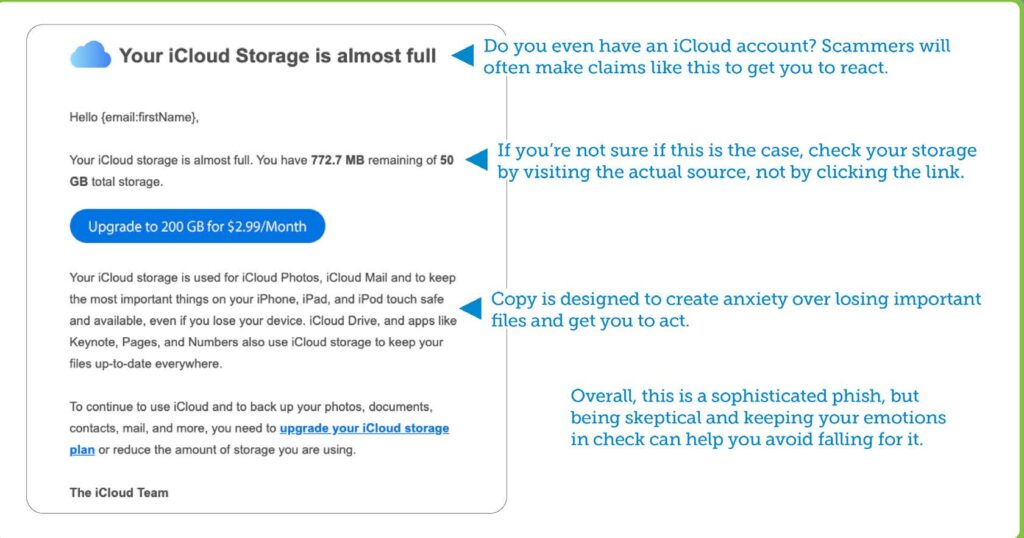
Did you know that according to the FTC, over 96% of today’s companies suffer from domain spoofing attacks? Here we take a closer look so you can spot the threat before it harms you or your organization.
Attackers often impersonate domains to fool victims and carry out attacks like conversation hijacking. They do so by using techniques such as typosquatting, replacing letters in a legitimate email domain with different ones or adding hard-to-notice characters to the legitimate email address. An attacker may even change the top-level domain (TLD) to .net or .co instead of .com, to fool unsuspecting victims. In preparation for the attack, cybercriminals register the impersonating domain. It can be easy to miss the subtle differences between the legitimate email domain and the impersonator.
How to avoid becoming a victim of Domain Impersonation:
- Pay close attention to domain names and web addresses.
- Be wary of hyperlinks and shortened urls, tools scammers often use to hide fake domains.
Example:
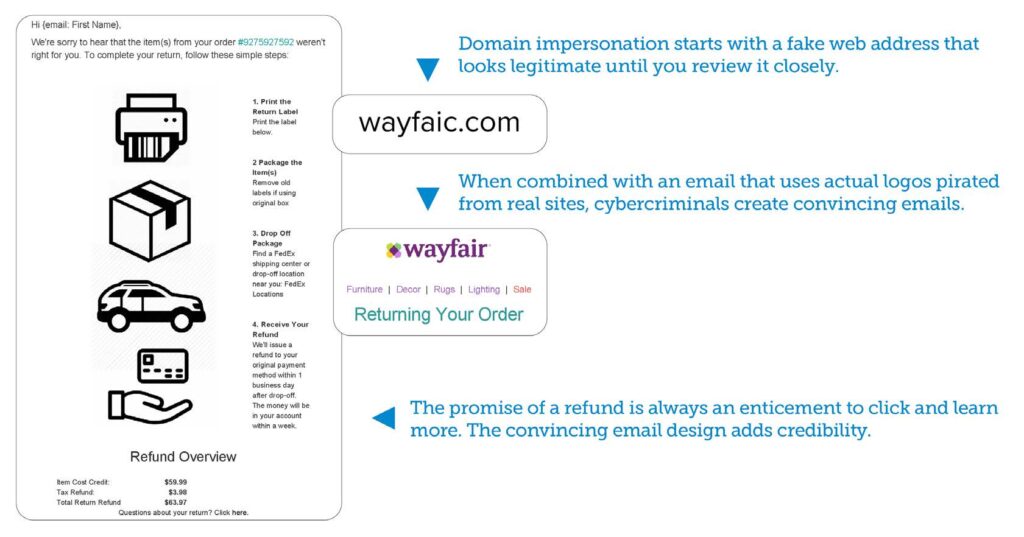
The email threats faced by organizations today vary greatly in complexity, volume, and impact. Here we take a closer look so you can spot the threat before it harms you or your organization.
Extortion scams are increasing in frequency and becoming more sophisticated. In these types of attacks, cybercriminals leverage usernames and passwords stolen in data breaches, using the information to contact and try to trick victims into giving them money. The scammers may claim to have a compromising video
or images from the victim’s computer and threaten to share it with their contacts unless they pay up.
Extortion leverages a variety of emotions to elicit a response, including fear, shame and guilt. If you’re targeted, you can prevent these types of cyberattacks from working by:
- Thinking rationally about the situation and keeping your emotions in check.
- Understanding that these types of attacks appear serious but are usually bluffs.
- Remembering that you are in control and that you have no obligation to respond.
- Reporting these emails to IT or the proper sources.
The sample shown highlights how extortionists craft their attacks.
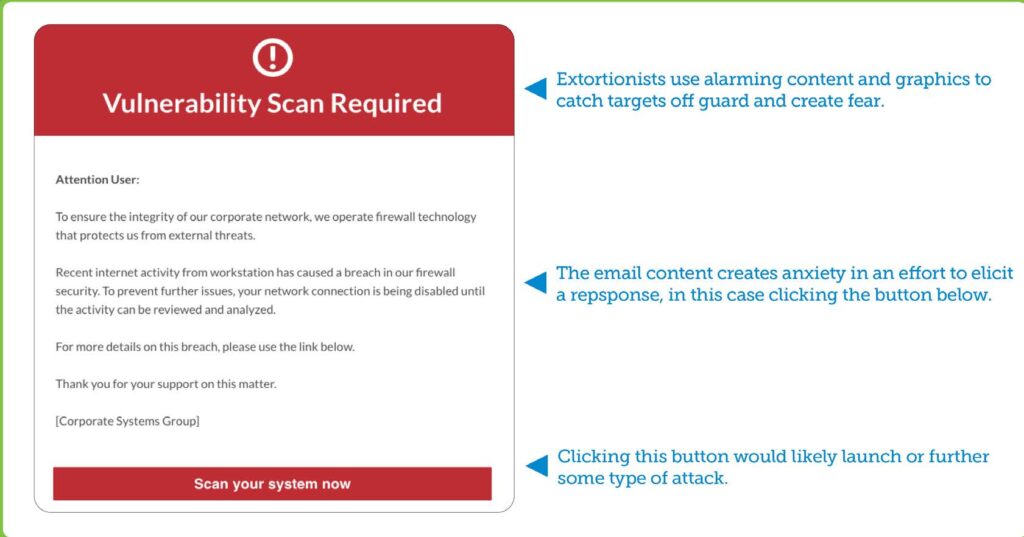
The email threats faced by organizations today vary greatly in complexity, volume, and impact. Here we take a closer look so you can spot the threat before it harms you or your organization.
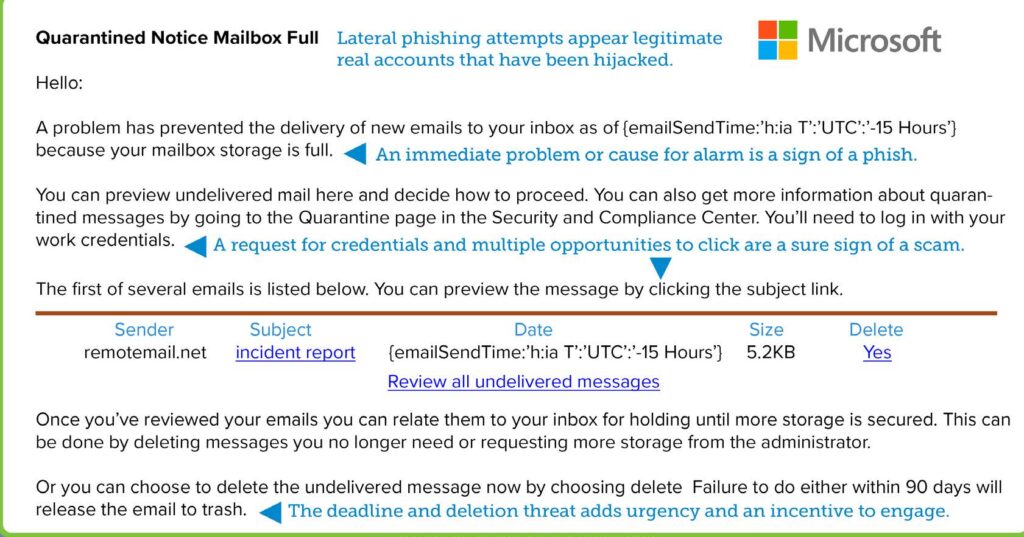
With lateral phishing attackers send phishing emails from hijacked accounts to contacts within and outside of the company to spread the attack more broadly. Because these attacks come from a legitimate email account and appear to be from a trusted colleague or partner, they tend to have a high success rate.
Despite these facts, targets can prevent lateral phishing from succeeding by:
- Being skeptical of emails from partners that are written in a different tone or style.
- Being wary of any requests for financial or confidential information.
- Verifying the sender’s identity with a phone call.
- Having a manager or colleague weigh in if you’re unsure.
- Alerting your IT team if you suspect anything suspicious as it could be part of a larger attack.
The sample shown highlights an example of lateral phishing.
The email threats faced by organizations today vary greatly in complexity, volume, and impact. Here we take a closer look so you can spot the threat before it harms you or your organization.
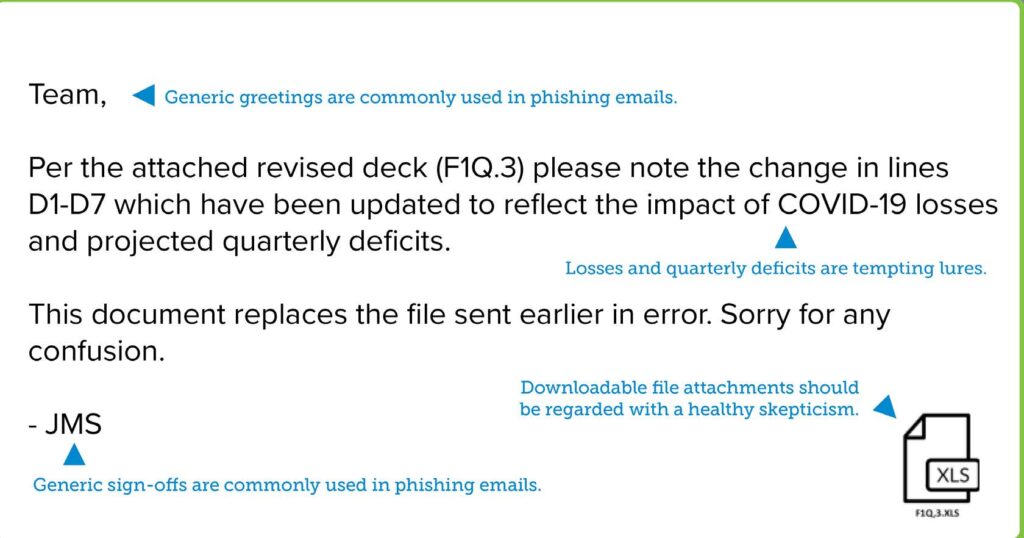
Cybercriminals use email to deliver documents containing malicious software, also known as malware. Typically, either the malware is hidden directly in the document itself, or an embedded script downloads it from an external website. Common types of malware include viruses, Trojans, spyware, worms, and ransomware, a favorite of cybercriminals who use it to infect networks and lock email, data, and other critical files until a ransom is paid. To get victims to click, attackers will disguise malware links or files with enticing names, like ‘payroll file’ or ‘merger plans.’
You can avoid malware by:
- Refraining from clicking links or downloading attachments in suspicious emails.
- Recognizing signs of phishing emails that deliver malware and avoiding or reporting them.
- Being a healthy skeptic when evaluating emails you receive.
The sample email highlights some of the clues you can watch for.
The email threats faced by organizations today vary greatly in complexity, volume, and impact. Here we take a closer look so you can spot the threat before it harms you or your organization.
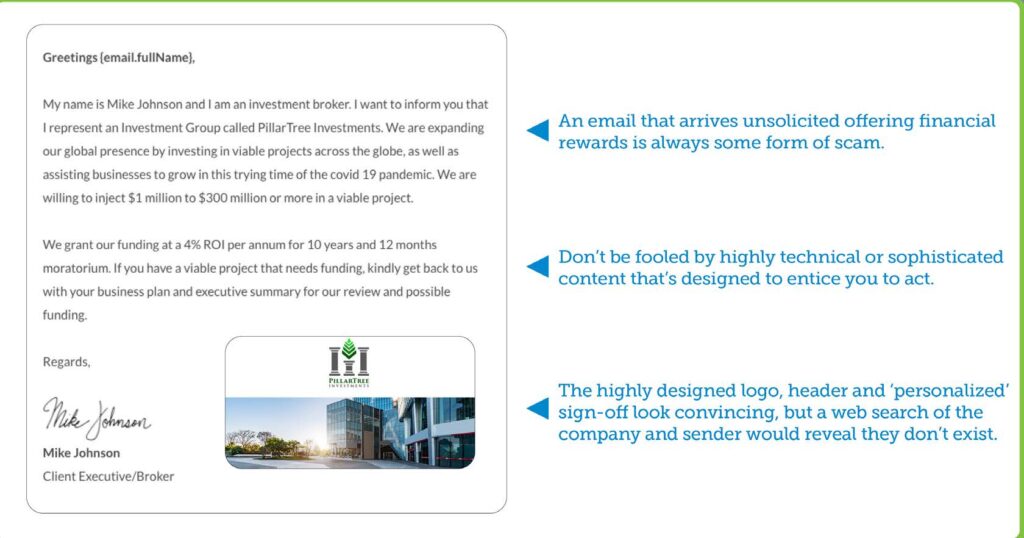
With email scamming, cybercriminals use fraudulent schemes to defraud victims or steal their identity by tricking them into disclosing personal information. Examples include fake job postings, investment opportunities, inheritance notifications, lottery prizes, and fund transfers. Scammers prey on an individual’s sympathy, charity, or fear. Unfortunately, many individuals fall for email scams, unwittingly sharing sensitive information or making payments to scammers.
Scam phishing emails can be recognized by their clues:
- A sender address you don’t recognize or doesn’t make sense.
- An empty ‘To’ address field or one that’s filled with names you
don’t recognize. - A send date or time that falls outside normal business hours.
- A heightened sense of urgency or alarm.
- Promises of rewards or threats if you do or don’t act.
The sample email highlights some of the clues you can watch for.
The email threats faced by organizations today vary greatly in complexity, volume, and impact. Here we take a closer look so you can spot the threat before it harms you or your organization.
Spam is any email that arrives in your inbox uninvited. While most spam contains harmless promotional content, some spam emails contain malicious links or attachments developed by cybercriminals. Clicking or downloading these can lead to identity theft, a ransomware attack or any number of other potentially devastating cyber threats.
Malicious spam can be spotted, however, by recognizing the clues found in most phishing emails.
These include:
- A sender address you don’t recognize or doesn’t make sense.
- An empty ‘To’ address field or one filled with names you don’t know.
- A send date or time that falls outside normal business hours.
- A heightened sense of urgency or alarm.
- Promises of rewards or threats if you do or don’t act.
The sample email highlights clues you can watch for.
The email threats faced by organizations today vary greatly in complexity, volume, and impact. Here we take a closer look so you can spot the threat before it harms you or your organization.
Spear phishing is a highly personalized form of email phishing attack. Cybercriminals research their targets and craft highly personalized messages, often impersonating a trusted colleague, website, or business. Spear-phishing emails try to steal sensitive information, such as login or financial credentials to commit fraud, identity theft, and other crimes. Social-engineering tactics are commonly used in spear-phishing attacks to increase the likelihood of success. These include a sense of urgency, brevity, and pressure.
Spear attempts can be spotted by recognizing their clues:
- Messaging that includes an uncomfortable level of
personalization coming from a source you don’t recognize. - References to topics or events that are oddly coincidental.
- A send date or time that falls outside normal business hours.
- A heightened sense of urgency or alarm.
- Promises of rewards or threats if you do or don’t act.
If you feel you’re been targeted, consider changing social networking settings to keep personal information private.
Example: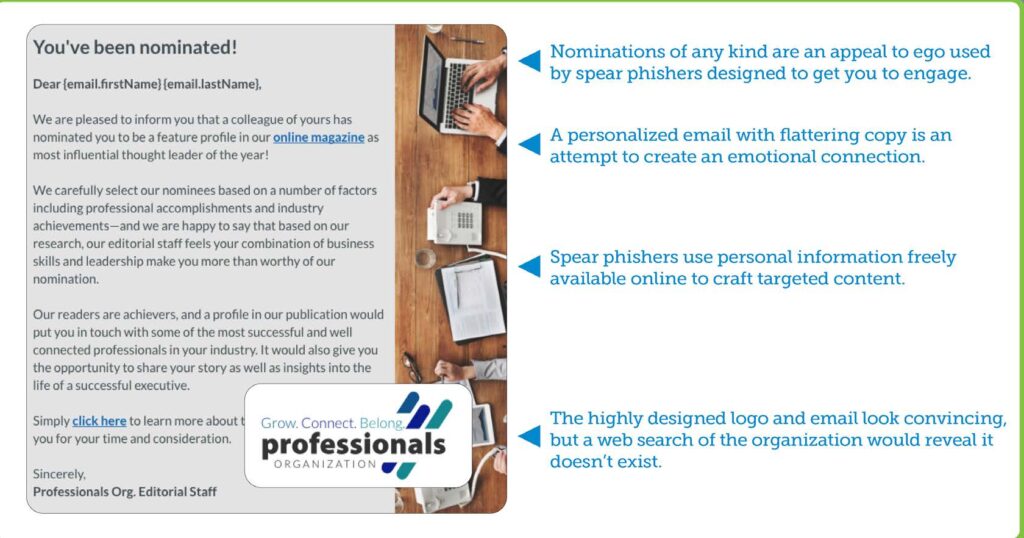
The email threats faced by organizations today vary greatly in complexity, volume, and impact. Here we take a closer look so you can spot the threat before it harms you or your organization.
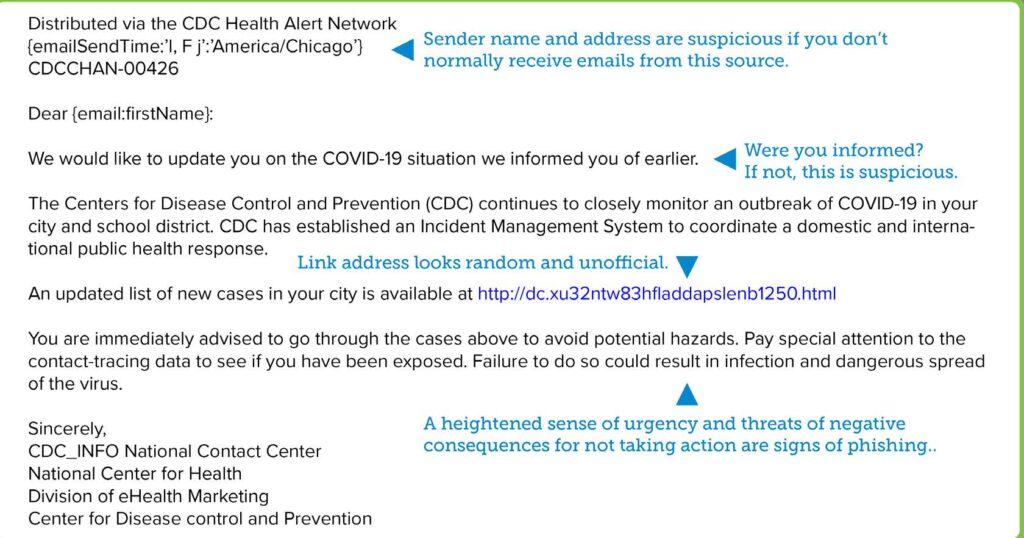
Cybercriminals use fake websites to trick victims into keying in sensitive information through a tactic known as URL phishing. The sites they develop and the web addresses they use may look legitimate, but engaging can lead to identity theft, data theft, compromised networks or a number of other potentially devasting cyberattacks.
URL phishing can be avoided by:
- Being a healthy skeptic when evaluating emails you receive.
- Hovering over links in emails to reveal the true web address.
- Keying in the site name being referenced instead of clicking on any links.
- Looking closely at web pages for signs it may be fake, such as poor grammar, poor design or branding that seems off or out of date.
The sample email shown highlights some of the clues you can watch for.